
A workbench that runs the process
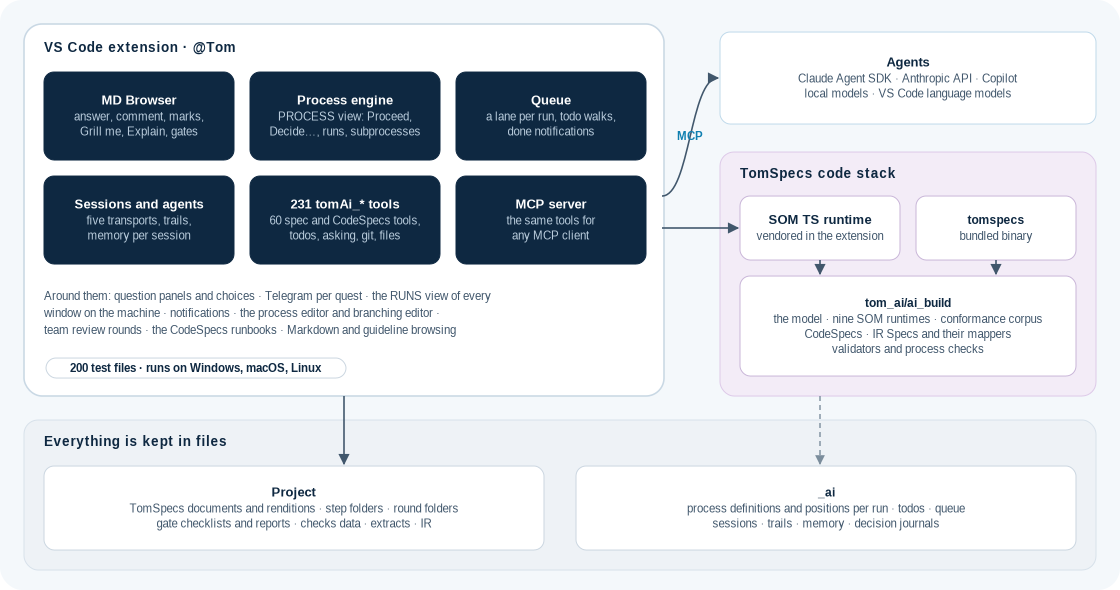
A TomSpecs project is worked with tools, not on paper. Today that is the Tom AI extension for VS Code: it renders the documents for review, moves the project through its process, hands every step to an agent, and gives the agents about sixty tools that read and write specifications through the model.
The setup today
The extension carries the process up to Phase 4 with full tool support. Underneath it is the TomSpecs code stack, reached through a vendored TypeScript runtime and a bundled binary; everything the tools produce lives in files that travel with git.
The MD Browser: review where the text is
The MD Browser renders a document - a specification rendition, a step's working file, a gate report - and lets you work in it rather than in a side channel.
Answer in place
Option buttons on every question block, the recommended option prefilled, navigation through the unanswered ones.
Accept or reject
Inline changes one by one, with change times and a "changed since" filter; comment blocks written and edited where they belong.
Grill me · Explain
Ask an agent to challenge a question or explain it in detail; a proposed answer comes back for Accept, Edit or Discard.
Consolidate a round
A merged team review with its authors, votes, individual answers and conflict blocks, decided into a team answer.
Buttons that move it
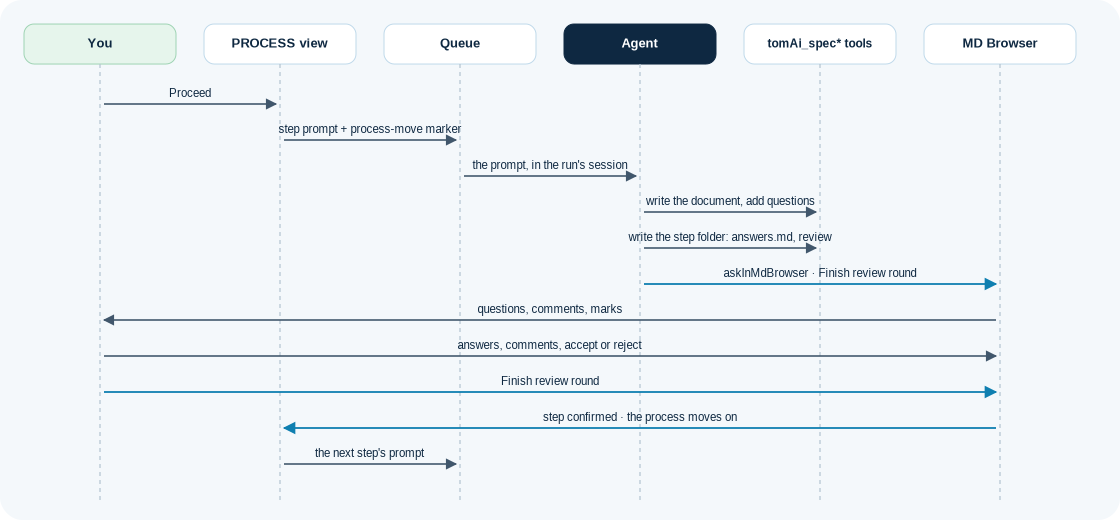
Finish review round confirms a review step and queues the next one; the gate buttons take a gate's decision in one click.
The process engine and the PROCESS view
The engine reads a process definition and keeps a project's position per run in a small YAML file, so the position is the same on every machine. The PROCESS view shows where a run stands and moves it.
- Proceed queues the step's prompt and moves on once that prompt, and everything it queued, is done.
- Decide… takes the decision after a gate, at the end of a phase or a repeatable level: go on, repeat,
or after a failed gate go back to its
onFailstep - or to the start of the phase. - Decision steps choose where the process goes next, from run parameters, by you, or judged by the agent; phases can name their successors with conditions, so a process can branch and meet again.
- Subprocesses and branches stack on a step, with inputs and outputs handed back: a review step starts
team_document_reviewthis way. - Runs keep several positions per project, each with its own chat variables, sessions and queue lane; reset a run or its process from the view.
- The process editor and the branching editor edit definitions; every jump and decision is written to a journal.
The four processes
| Process | For |
|---|---|
| tom_specs | The project flow: initial development and change mode, Phases 0 to 8C, ten gates |
| team_document_review | A review round by a team, started from a review step |
| idea_to_todos | From an idea to todos filed in the projects it affects |
| process_design | Designing or revising a process - this one included |
Queue, sessions and agents
A lane per run
Prompts are sent one lane per run, runs in parallel. A step queues walks over its todo groups; a todo that needs your decision holds the walk. Done notifications reach any project, run or session.
Conversations that last
Continued, fresh per prompt, or fresh per iteration of a walk - each with its profile, its trails and its memory, so a later step can read what an earlier one did.
Five ways to an agent
The Claude Agent SDK, the Anthropic API, Copilot, local models and VS Code's language models, all reaching the same tools through the extension's MCP server.
It waits for you
Questions with choice buttons, documents with decision buttons, one open question per run in a "waiting for you" panel - and on Telegram, per project. A question waits as long as you need.
Every run on the machine
The RUNS view lists every run of every window with its position and what it waits for; a notification log keeps what agents and you did across windows.
Tools that work through the model
The extension registers 231 tools; about sixty of them work on specifications. They read and write a document through the SOM runtime, so a path that does not exist, a value of the wrong type or a stale file is refused instead of written.
| Area | What the tools do |
|---|---|
| Reading | Outline, section, search with paged cursors, reflection of what the model allows at a path, rendering as Markdown |
| Editing | Content, form fields, headlines, list items and moves, code routing and generation units - single or as one atomic batch, optionally as marked changes for review |
| Review | Comments, questions, answers and proposed answers, deciding marks, removing what is applied, answers.md for a step folder |
| Team review | Create a round, track who returned, merge the copies, decide conflicts |
| Checks | Three-tier validation, required fields, question and feature registers, Project Idea coverage, the authorization cross-check, model coverage, answer import |
| CodeSpecs | Areas, routing, extracts, the Stage-A gate, verdicts, the todo tree, the context of an authoring step, mapping the IR, validation, tracing between code and specification, the status of a run and its runbooks |
| Process and todos | Move the process, suggest a subprocess, create and update todos, queue walks, send work to another project, ask the user |
A review step, end to end
What happens between your Proceed and the next step - the same sequence for every review step of Phases 1 to 3.
One binary: tomspecs
Every command-line tool of the stack is a command of one binary, built on the framework's CLI base: validation and
the process checks (:spec-*), CodeSpecs (:codespecs-*), the IR (:ir-map,
:ir-emit), the generators and the documentation gates. Several commands run in one call and stop at
the first failure; every command runs in the binary's own process, and Dart formatting is linked in, so no SDK is
needed beside it. The processes, the scripts and the VS Code extension call these commands; the extension bundles
the binary for each platform.
tomspecs :spec-validate my_blueprint.docspecs.yaml
tomspecs :codespecs-validate --ir spec/irspecs
tomspecs :ir-map --mapper dart-tom --ir spec/irspecs --out generated
The single binary is in the repository and ships with the extension; on pub.dev the current
tom_specs_clitool still carries the separate tools (see Get started) until
the next release.
The code stack under every tool
Every tool reaches the same stack. The model is the single source; the runtimes are generated from it in nine languages and held to one behaviour by a shared conformance corpus, so any tool in any language gets the same answers. The packages are listed on the packages page.
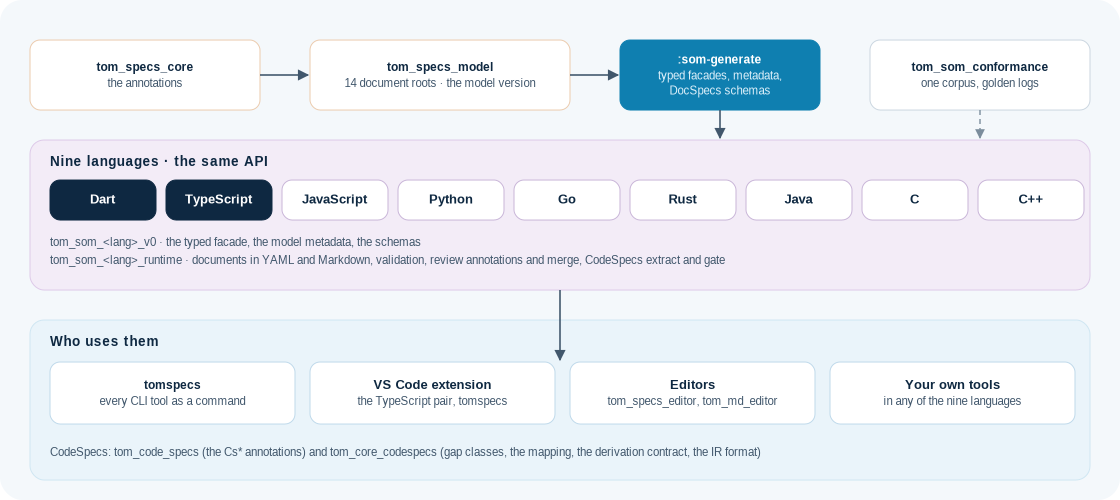
tom_specs_editor
Model-driven authoring in Tom Forge: every field with its type and help, an agent that edits the model, undo and a change log. It is the authoring tool, not the review tool.
tom_md_editor
A Markdown editor with a review engine on the Dart runtime: marks accepted and rejected, comment blocks written in the same notation.
Everything is a file
The tools share files, not memory. Documents are written through the runtimes with a revision check, so an edit made against an older read is refused; the process state is written by one implementation only.
| What | Where |
|---|---|
| Documents | <spec-root>/…/*.docspecs.yaml and their Markdown renditions, with the review annotations inside |
| Step folders | phase<N>_…/<NN_step>/ with answers.md, review documents, the document as the step left it |
| Team rounds | a round folder with round.yaml, the base, one copy per member and the merge |
| Gates | gates/G<N>.checklist.yaml and the reports under quality/evidence/gates/ |
| Phase 4 | the extracts and the gate record under generated-doc/codespecs_extracts/, the IR under irspecs/ |
| Process | definitions in _ai/processes/; the position per run in process-state.<project>[.<run>].yaml |
| Work | todos, queue entries, sessions, trails and memory under _ai/ |
Planned
- The extension's engine becomes a shared AI runtime, one per project, that VS Code and other hosts attach to.
- Webforge - Tom Forge with a quest application per project - and Webwork, where reviewers who do not use VS Code review documents, on that runtime.
- A remote control that shows and steers every runtime on every machine.
The tooling's architecture, today and planned, is TomSpecs tooling; the extension's source is al-the-bear/tom_vscode, not yet on the Marketplace.